
Xiaomi POCO C85 Screen Replacement in Stockholm
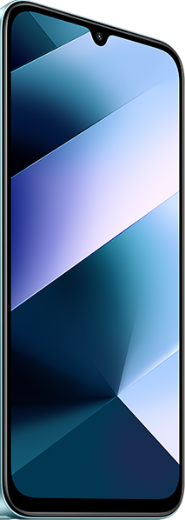
Has your POCO C85 got a cracked or black screen? The good news is that C85 screens are affordable and the swap is quick. Hand the phone in at Phoniva on Sveavägen 74 in Stockholm and we will fit a complete new 6.9-inch screen and check that everything works before you collect it.
POCO C85 screen replacement – price
| Repair | Price | Warranty |
|---|---|---|
| C85 complete display (Original Quality) | Contact us | 6 months |
| Diagnostics (deducted from the repair) | 250 kr | – |
We keep the price updated to what screens cost us. A quick call to 08-656 77 40 gives you the current figure. The 250 kr fault check is charged only when no repair follows.
All prices for the phone: POCO C85 repair. Battery running out? POCO C85 battery replacement. På svenska: byta skärm POCO C85.
Glass replacement on the POCO C85
Looking for a C85 glass replacement? The glass and display belong together, which is why the complete screen is changed rather than the glass alone. Get in touch for a quote.
Facts about the C85 screen
Xiaomi lists 6.9 inches, 1600 × 720 pixels (HD+) and up to 120 Hz. Brightness is 660 nits normally and 810 nits in high-brightness mode, and the screen covers 83 percent of the NTSC colour space. The selfie camera sits in a small drop at the top, which Xiaomi calls Dot Drop.
How to recognise a broken screen
- The glass has cracked in a web, often from a corner.
- The picture has streaks or a coloured edge.
- Part of the screen is darker or has a growing spot.
- Some keyboard letters cannot be pressed.
- The phone vibrates but the screen stays black.
Fingerprint keeps working
On the C85 the fingerprint reader is in the power button. It is not touched when the screen is replaced, so you can unlock as usual straight afterwards. We test face unlock with the 8 MP selfie camera once the new screen is in place.
Our process
Look and ask
We go through the damage and ask how the phone was dropped, since a hard hit on a corner can bend the frame.
Lift off the old screen
The phone is warmed so the adhesive lets go. The broken screen is released and the battery disconnected for safety.
Try the new one before fixing it
The replacement is connected without adhesive. We check touch, colours, brightness and 120 Hz.
Fit and test
When everything works the screen is fixed with new adhesive. Finally we try calls, speaker, camera and charging.
IP64 and water
IP64 means the C85 resists dust and the odd splash, yet it must never be submerged. After the screen swap the phone gets a new seal, but keep it dry.
Turnaround
A stocked screen means you can usually pick the phone up after lunch. When we need to order, you hear from us the day it lands.
Which screen do we fit?
Our replacement is Original Quality and matches the factory unit for resolution, brightness and 120 Hz. We do not pick the very cheapest panels that only manage 60 Hz or have paler colours.
Why C85 screens crack
A screen of almost seven inches has a large surface and sticks out of a pocket. The phone weighs 205 grams, so it falls fairly heavily. Typically it slips from your hand stepping off the bus or pulling it from a jacket, and a corner hits the pavement first.
The panel can be broken without cracks
Sometimes the glass is intact but the picture is wrong. Black spots, lines or a screen that only shows black after a drop mean the panel under the glass is damaged. The fix is the same – a new screen.
The phone presses things by itself
If apps open or keys are pressed without you touching the screen, the touch layer is usually damaged. First remove the protector, wipe the screen and restart. If that does not help, the screen needs replacing.
Is it just the protector?
Shattered tempered glass on top can fool you. Ease it off from one corner; when the real display beneath is unharmed, buying a fresh protector solves it.
The screen after water
Does the screen flicker or show spots after the phone got wet? Power down at once and keep it unplugged – trapped moisture is able to and damage the contacts between screen and mainboard. Come in as soon as you can. Liquid damage has no warranty.
A black screen can have other causes
A phone showing nothing may also have a completely flat battery or be frozen. We connect a charger and test before deciding the screen must be replaced.
The camera drop
The selfie camera sits in the drop at the top of the screen. After the swap we take a test photo to check the new panel lines up with the camera and no shadow appears.
120 Hz – worth keeping
The C85 is one of few phones in its price class with 120 Hz, which makes scrolling smoother. After a screen swap we check you can still select 120 Hz in settings and that the picture does not flicker at the high rate.
Crack in the corner – do not wait
A small corner crack may seem harmless but usually grows. Glass splinters can also cut fingers, and dust can get in. The sooner the screen is replaced, the lower the risk that the touch layer is damaged too.
Children and first phones
The C85 is a common first phone for children, so screen swaps are fairly common. It pays to fit a shockproof case and a protector straight after the repair.
HD+ and sharpness
At 1600 × 720 pixels the screen is not as sharp as pricier models, but it is plenty for video, social media and messages. A replacement with the wrong resolution or poorer colours still shows straight away, especially in text and icons. So we compare the new screen’s picture with a reference before bonding it.
Screen and battery together
The battery is always disconnected when we replace the screen. An older C85 with a tiring battery can have both parts renewed in a single visit, so it is opened just once and comes back looking and feeling fresh. Ask us at drop-off.
Readability outdoors
660 nits is enough indoors and on cloudy days, and in sunshine the phone raises it to 810 nits. A display that turned dim or patchy after a fall probably has a hurt panel; we test minimum and maximum brightness once the new one is in.
The first day
The adhesive needs a few hours to cure. Wait until the next day before fitting a new protector and do not press hard on the edges.
Same screen in every colour
Black, Purple and Green have identical fronts, so the same screen fits whatever colour your C85 is.
The memory card
If your photos are on a microSD card, you can take it out before drop-off. Nothing in the phone’s memory is erased by a screen swap.
Before your visit
Note the screen-lock code and ideally back up photos and chats.
Accident insurance
If your home insurance covers accidents you may be reimbursed for the screen. We give you a receipt to send in.
Warranty
The screen and our work have a 6-month warranty. Damage from new drops and liquid is excluded.
Questions and answers
Do you replace only the glass?
No, the whole screen.
Will my photos be erased?
No, nothing disappears.
Can I just walk in?
Yes. Call first if you want to know the screen is in stock.
Address
Phoniva, Sveavägen 74 in Vasastan. More Xiaomi and POCO: Xiaomi repairs.
More on the POCO C85
POCO C85 price list · POCO C85 battery replacement · Byta skärm POCO C85 · Byta batteri POCO C85


