
Google Pixel Watch 2 Screen Replacement in Stockholm
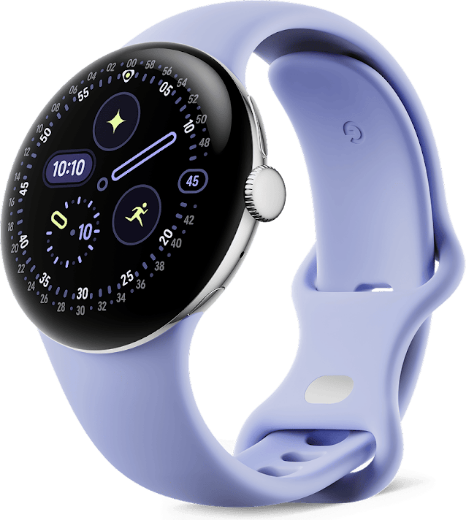
The Google Pixel Watch 2 has elegant, frameless glass – which is exactly why that glass is what breaks when the watch hits something. If the display on yours is damaged, we replace the whole thing on the 41 mm watch at Sveavägen 74 in Stockholm, seal it and test every function. Walk in without booking.
Display price
| Repair | Price | Warranty |
|---|---|---|
| Pixel Watch 2 new display (Original Quality) | Contact us | 6 months |
| Diagnostics (deducted from the repair) | 250 kr | – |
For a 2023 model, both price and availability vary. Call 08-656 77 40 and we will check. If you decide to repair, the 250 kr diagnostic fee is not charged.
All prices for this watch (Swedish): Pixel Watch 2 repair. Battery running out early? Pixel Watch 2 battery replacement. På svenska: byta skärm Pixel Watch 2.
The Pixel Watch 2 display
GSMArena lists an AMOLED panel at 450 × 450 with up to 1000 nits, under curved Gorilla Glass 5. The watch only comes in 41 mm, which makes finding the right part straightforward. Glass, touch layer and panel are bonded, so any damage means a whole new display.
Signs of a broken display
- Cracks in the dome, often from one edge.
- Black or coloured spots that will not go away.
- Swipes not registering.
- A dark screen while the watch vibrates.
- Flashing or stripes in the image.
Restart with a long press on the crown, and check water lock if it got wet. If the fault remains, the display needs replacing.
Why the glass breaks
The dome has no frame and is the most protruding part of the watch. A sideways knock against a door frame, table edge or dumbbell therefore often hits the glass directly. Gorilla Glass 5 is tough but not indestructible.
Protecting it until the repair
Cracked glass lets moisture in. Sweat and water can reach the electronics and cause corrosion. Put clear tape over the crack and take the watch off in the shower until it is fixed.
How we do it
Check
We confirm it is a Pixel Watch 2 and look for damage to the aluminium case.
Opening
We ease the case apart with thin tools so no cables or sensors are harmed.
Testing
The new display is connected and checked – colour, light, touch and always-on – before it is fixed.
Fitting
The display is mounted with a new seal. Then we try the crown, side button, vibration, heart rate, the charging pins and Bluetooth.
Water resistance
After opening we seal the watch again, but cannot guarantee factory-level protection. Keep it dry for a couple of days.
Availability and timing
Pixel Watch 2 displays are not always in stock. We check before you hand the watch in; with the part here, it is often ready the same day.
Quality
Our displays are Original Quality, with correct colours and normal touch feel.
Brightness and legibility
At 1000 nits the display is clear indoors but can be harder to read in strong sun than newer models. A damaged panel makes this worse; after the swap we check brightness is even.
Dark screen without a crack
If the battery is fully drained, the watch shows nothing until it has been on the charger for a while – also check the charging pins are making contact. A frozen system often just needs a restart.
Watch responding by itself
Apps opening without you touching the watch can be caused by water, a loose screen film or a damaged touch layer. Wipe it and remove the film first.
Crown and touch
The crown and touchscreen control different things, so we test them separately before deciding whether the display should be replaced.
Sensors
The watch’s health readings come from the back, an area we do not touch during a display job.
Battery at the same time
With only 306 mAh, the Pixel Watch 2 battery is often worn after a few years. Since the watch is open anyway, we can replace the cell in the same job.
Common accidents
The gym, the bike ride and everyday life cause most damage: a kettlebell against the wrist, a fall off the bike, or the watch knocking the sink. The dome nearly always takes the first hit.
After the swap
On the first day: charge by all means, but do not shower or train hard with the watch on. Then try touch, the crown and wrist-raise wake. If something is wrong within the warranty, come back.
Protection
A protector shaped to the dome lowers the risk of new cracks.
LTE
The LTE version’s eSIM is unaffected by the swap. We test the connection before handing it back.
Wear OS after the swap
New hardware does not affect the system; per GSMArena, the Pixel Watch 2 has received Wear OS all the way to version 7.
Scratches versus cracks
Fine scratches in the dome can stay as long as the image is clear. A crack lets moisture in and spreads.
Charging pins after the swap
The Pixel Watch 2 charges via pins on the back. Once the watch has been opened, we check the pins make good contact with the charger, so charging works properly afterwards.
Day and night
The Pixel Watch 2 is light and comfortable to wear at night. Cracked glass can snag on sheets and sleeves, and sharp flakes can come loose, so do not wait too long even if the watch still works.
A watch with a new owner
If you have been given or bought a used Pixel Watch 2 with a damaged display, a repair can make it like new. During diagnostics we also look at the battery and charging pins.
After a drop without a crack
Sometimes the glass is intact but the watch behaves oddly after a fall: spots, stripes or touch that stopped working. The panel may be damaged inside; we check during diagnostics.
From steel to aluminium
The first Pixel Watch had a stainless-steel case, but the Pixel Watch 2 switched to aluminium and became lighter. Aluminium dents more easily in a fall, so if the case edge is damaged we make sure the new display still seals before fitting it.
Colours and straps
The Pixel Watch 2 was sold in several case colours and with various straps. Colour does not affect which display fits, since they all share one size. We take the strap off during the repair and refit it afterwards.
Pixel Watch 2, 3 and the first generation
The Pixel Watch 3 comes in two sizes and the first generation has a steel case; none share a display with the Pixel Watch 2. See Pixel Watch 3 screen replacement and Pixel Watch (2022) screen replacement.
In a hurry?
Using the watch at work? Tell us when you drop it off.
Recycling
The broken display goes to electronics recycling.
Insurance
With all-risk cover, your insurer may pay. Our receipt describes the damage and the repair.
What to bring
- Your phone with data synced.
- The unlock code.
- The charger if charging is also playing up.
Worth it?
Compared with buying a new watch, a display repair is usually the cheaper route.
Warranty
The new display and our work carry six months’ warranty. New drops and liquid damage are excluded.
Questions
Can just the dome be replaced?
No, glass and panel are replaced together.
Does everything stay?
Yes, nothing is erased.
Booking needed?
Not necessary – a phone call tells you whether the part is in.
Address
Phoniva, Sveavägen 74, Stockholm. All Pixel: Google Pixel repairs.
More on the Pixel Watch 2
Pixel Watch 2 price list · Pixel Watch 2 battery replacement · Byta skärm Pixel Watch 2 · Byta batteri Pixel Watch 2


